Project
Ed Teacher Reports
Overview
Ed is HMH’s classroom platform for teachers and students. Teachers can perform many non-teaching tasks like manage class rosters, distribute assignments, and track student progress against state standards. Students logging into Ed can see what has been assigned to them, turn in assignments, access course materials, and view grades.
Challenge
Teachers needed better ways to manage their classrooms. They often used a patchwork of digital and analog tools to track progress and manage assignments. HMH had recently acquired another educational company and the timeline to harmonize their teacher views with Ed’s was going to be tight.
Summary

Role
Team Lead User Experience Designer for Reporting

Responsibilities
Lead UX design on agile team, Plan design sprints, Adapt existing designs, Run design reviews with the cross-functional team, Develop interactive prototypes

Collaborators
Product Management, Engineering, User Research, Textbook Authors

Deliverables
Wireframes, Interactive Prototypes
Approach
Wireframes
When inheriting another designers work, I always like to meet with the previous designer to discussion intention, blockers, and what needs to be unchanged. I then have a similar meeting with the engineering team to see if they can spot any issues for developement cycles. In this case, meeting with engineering revealed that several data points wouldn’t be available for the first iteration. I removed those from the design and let the product owner know so that it wouldn’t be a surprise and also so that it could be added to the backlog and prioritized appropriately.
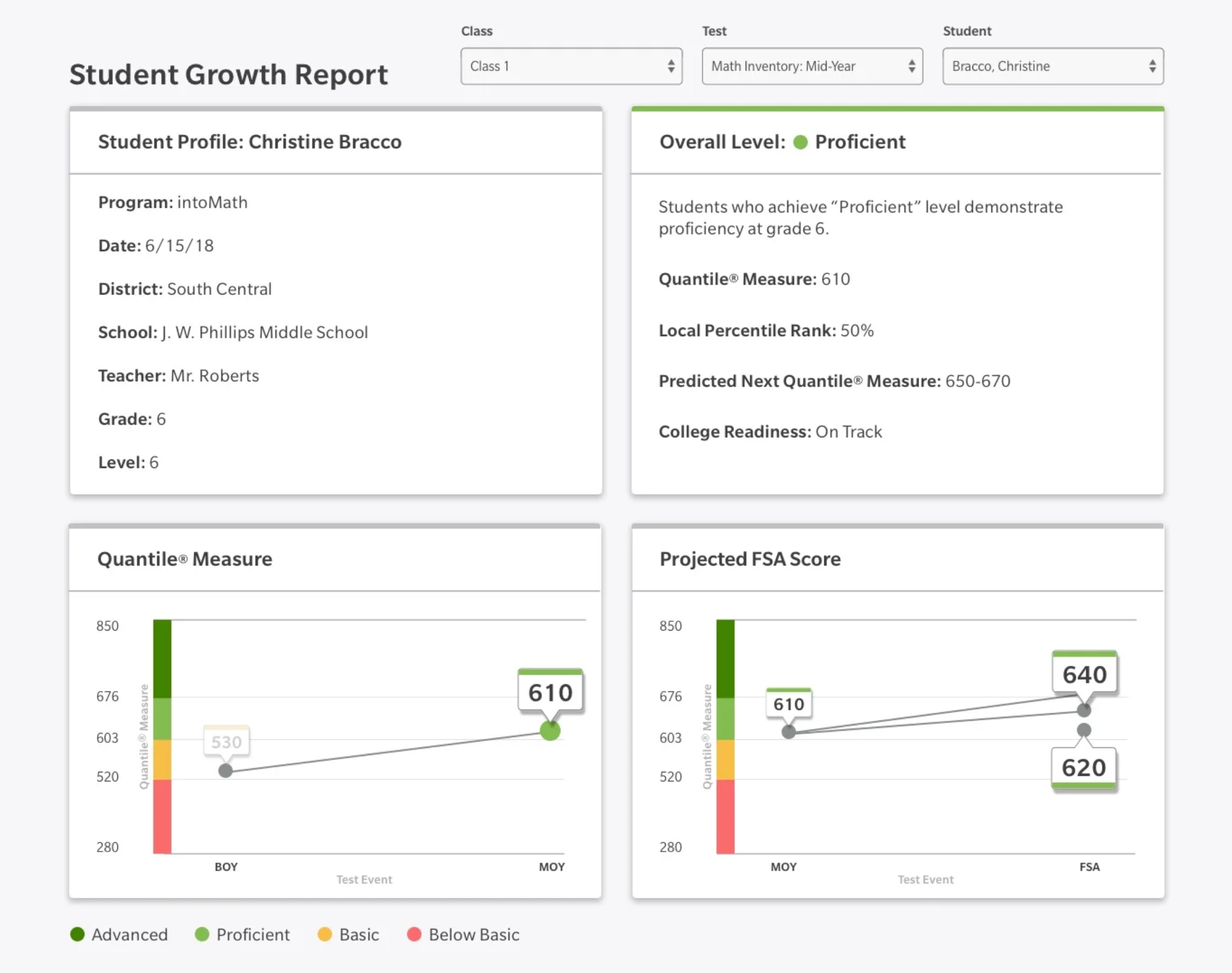
Early version - Ed Platform Teacher Reports
Single Student View
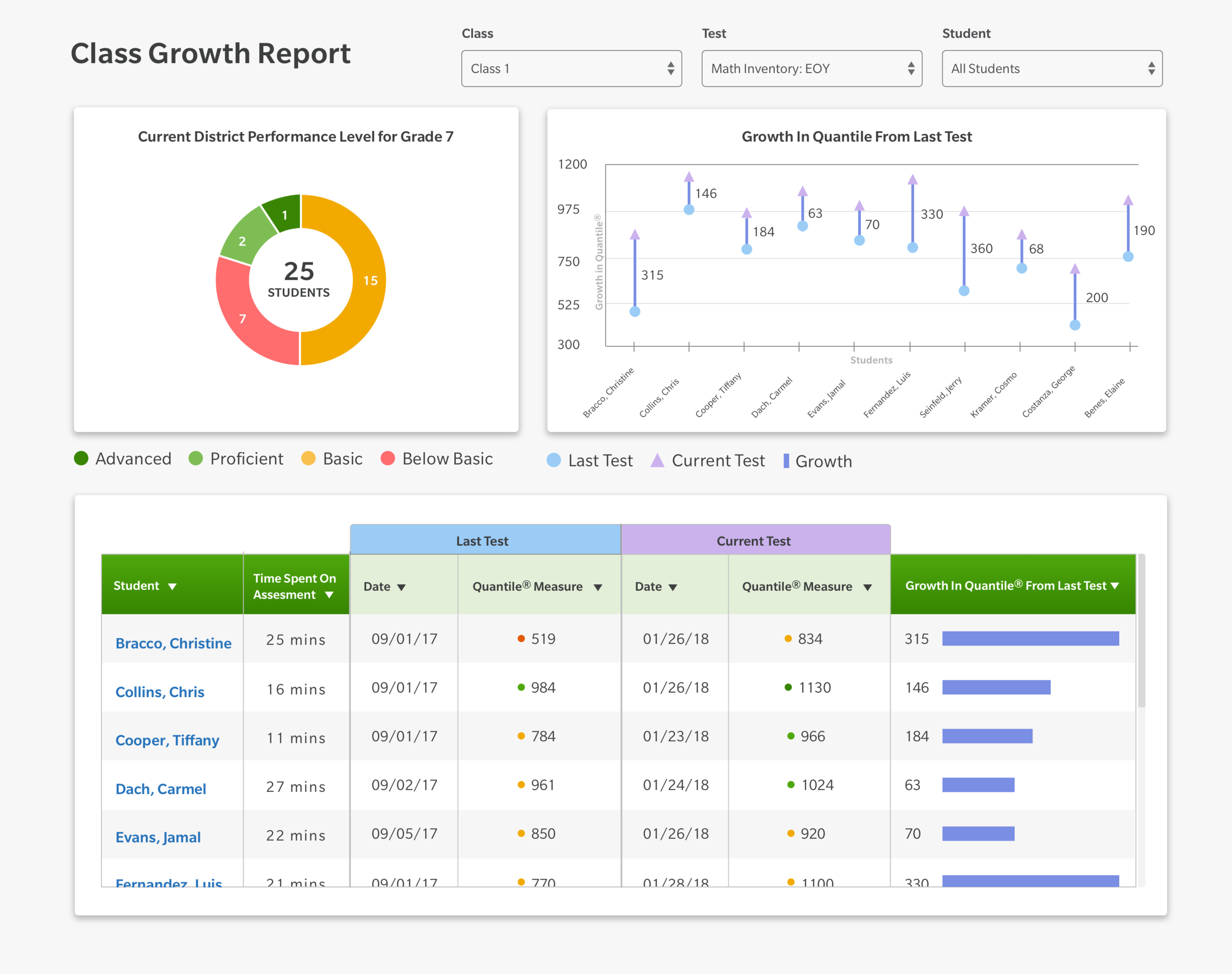
Early version - Ed Platform Teacher Reports
Class View
Interactive Prototypes
With a design in mind, I set out to create an interactive prototype that would show the teacher’s experience with the data, including hover effects, click events, and transitions. The company’s design system was not used by the original designer so I made sure to bring the design into compliance, which reduced making bespoke components and made the design cohesive with the rest of the platform.
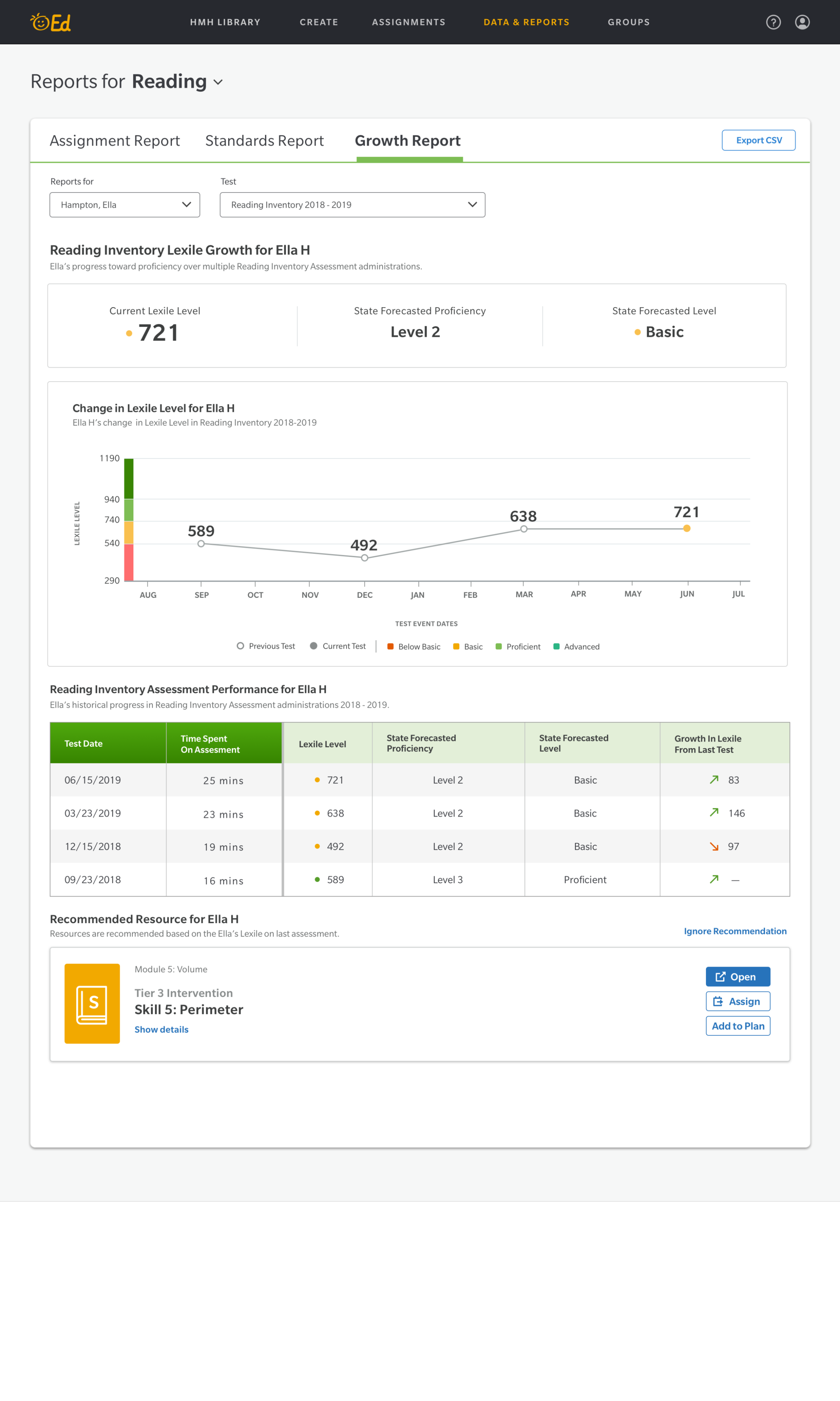
Revised version - Ed Platform Teacher Reports
Single Student View
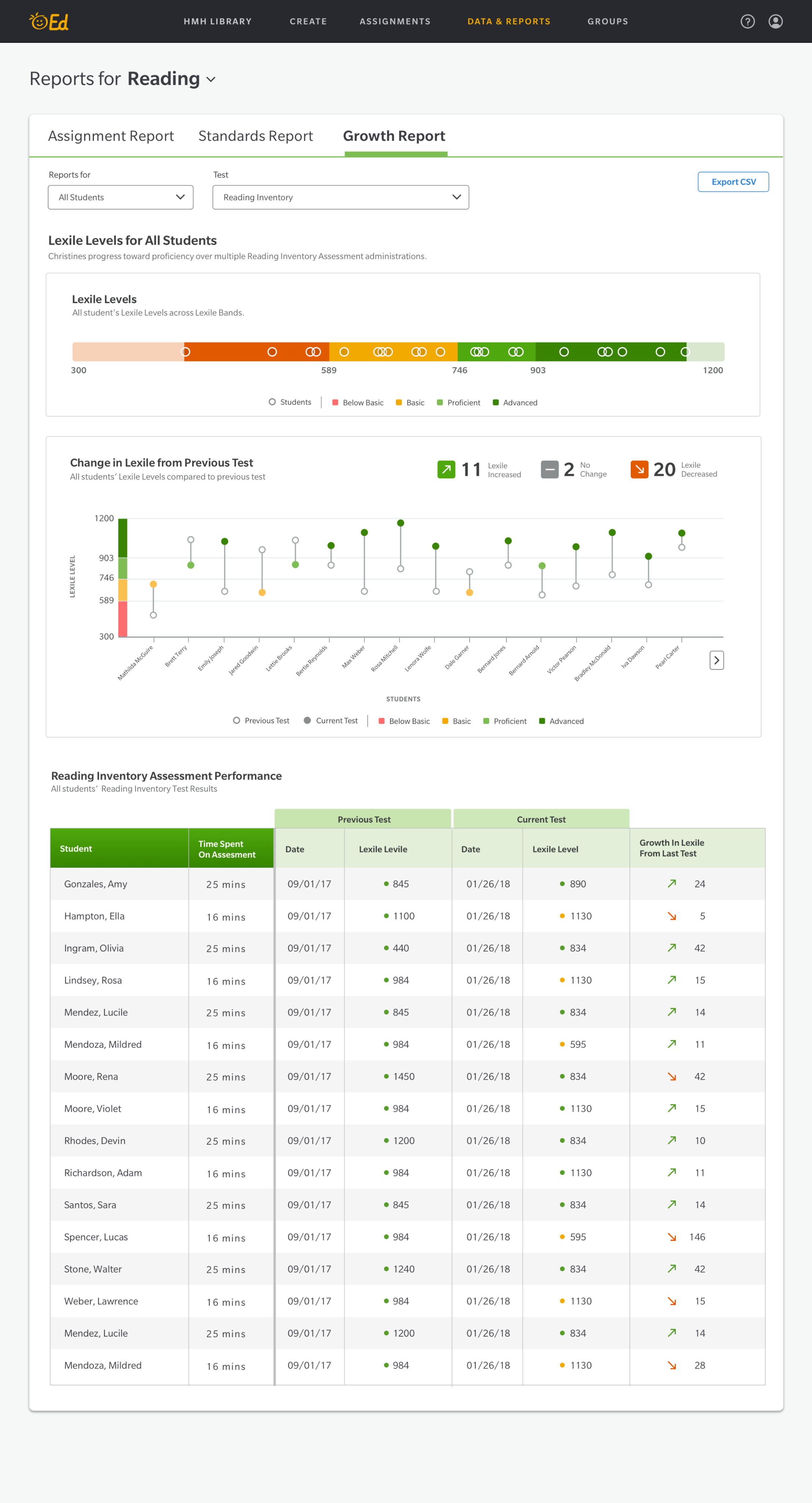
Revised version - Ed Platform Teacher Reports
Class View

Other Projects
View Project
→

View Project
→

Let’s Connect


CONTACT
480-414-7360
g.w.pouliot@gmail.comSOCIAL
Project
Ed Teacher Reports
Overview
Ed is HMH’s classroom platform for teachers and students. Teachers can perform many non-teaching tasks like manage class rosters, distribute assignments, and track student progress against state standards. Students logging into Ed can see what has been assigned to them, turn in assignments, access course materials, and view grades.
Challenge
Teachers needed better ways to manage their classrooms. They often used a patchwork of digital and analog tools to track progress and manage assignments. HMH had recently acquired another educational company and the timeline to harmonize their teacher views with Ed’s was going to be tight.
Summary
Role
Team Lead User Experience Designer for Reporting
Responsibilities
Lead UX design on agile team, Plan design sprints, Adapt existing designs, Run design reviews with the cross-functional team, Develop interactive prototypes
Collaborators
Product Management, Engineering, User Research, Textbook Authors
Deliverables
Wireframes, Interactive Prototypes
Approach
Wireframes
When inheriting another designers work, I always like to meet with the previous designer to discussion intention, blockers, and what needs to be unchanged. I then have a similar meeting with the engineering team to see if they can spot any issues for developement cycles. In this case, meeting with engineering revealed that several data points wouldn’t be available for the first iteration. I removed those from the design and let the product owner know so that it wouldn’t be a surprise and also so that it could be added to the backlog and prioritized appropriately.
Early version - Ed Platform Teacher Reports
Single Student View
Early version - Ed Platform Teacher Reports
Class View
Interactive Prototypes
With a design in mind, I set out to create an interactive prototype that would show the teacher’s experience with the data, including hover effects, click events, and transitions. The company’s design system was not used by the original designer so I made sure to bring the design into compliance, which reduced making bespoke components and made the design cohesive with the rest of the platform.
Revised version - Ed Platform Teacher Reports
Single Student View
Revised version - Ed Platform Teacher Reports
Class View

Other Projects
View Project
→
View Project
→

Let’s Connect

CONTACT
480-414-7360
g.w.pouliot@gmail.comSOCIAL
Project
Ed Teacher Reports
Overview
Ed is HMH’s classroom platform for teachers and students. Teachers can perform many non-teaching tasks like manage class rosters, distribute assignments, and track student progress against state standards. Students logging into Ed can see what has been assigned to them, turn in assignments, access course materials, and view grades.
Challenge
Teachers needed better ways to manage their classrooms. They often used a patchwork of digital and analog tools to track progress and manage assignments. HMH had recently acquired another educational company and the timeline to harmonize their teacher views with Ed’s was going to be tight.
Summary
Role
Team Lead User Experience Designer for Reporting
Responsibilities
Lead UX design on agile team, Plan design sprints, Adapt existing designs, Run design reviews with the cross-functional team, Develop interactive prototypes
Collaborators
Product Management, Engineering, User Research, Textbook Authors
Deliverables
Wireframes, Interactive Prototypes
Approach
Wireframes
When inheriting another designers work, I always like to meet with the previous designer to discussion intention, blockers, and what needs to be unchanged. I then have a similar meeting with the engineering team to see if they can spot any issues for development cycles. In this case, meeting with engineering revealed that several data points wouldn’t be available for the first iteration. I removed those from the design and let the product owner know so that it wouldn’t be a surprise and also so that it could be added to the backlog and prioritized appropriately.
After some pencil sketching at my desk, I came up with options to review with the product owner and engineers. I blocked out these options in Sketch for discussion with the larger team. We debated the clarity, usability, and ease of development of the design options and then came to a consensus.
Early version - Ed Platform Teacher Reports
Single Student View
Early version - Ed Platform Teacher Reports
Class View
Interactive Prototypes
With a design in mind, I set out to create an interactive prototype that would show the teacher’s experience with the data, including hover effects, click events, and transitions. The company’s design system was not used by the original designer so I made sure to bring the design into compliance, which reduced making bespoke components and made the design cohesive with the rest of the platform.
Revised version - Ed Platform Teacher Reports
Single Student View
Revised version - Ed Platform Teacher Reports
Class View

Other Projects
View Project
→
View Project
→

Let’s Connect

CONTACT
480-414-7360
g.w.pouliot@gmail.comSOCIAL